

Guten Tag,
mal was ungewöhnliches: Ich wollte die Kopfgrafik ändern (Größe).
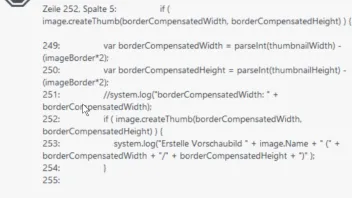
da bekomme ich diese Meldung.
An meinem Rechner kann es kaum liegen, 16 GB Arbeitsspeicher
Ich probiere es auf meinem Rechner zu Hause noch mal aus

Guten Tag,
mal was ungewöhnliches: Ich wollte die Kopfgrafik ändern (Größe).
da bekomme ich diese Meldung.
An meinem Rechner kann es kaum liegen, 16 GB Arbeitsspeicher
Ich probiere es auf meinem Rechner zu Hause noch mal aus
Wenn die Bilddatei sehr groß ist, könnte es helfen die Datei vor dem Import in Zeta Producer in einer Bildbearbeitung etwas runter zu rechnen.
Es könnte auch sein, dass nach dem Beenden und neu starten des Zeta Producer bzw. des Systems der Import ohne Fehler läuft.
"Sehr groß" bezeichnet hier die Pixel-Abmessungen (also Breite und Höhe) des Bildes, nicht die Dateigröße der Bilddatei.
Die Meldung "Nicht genügend Arbeitsspeicher" erhalte ich heute auch öfter!
Überwiegend in der Bildbearbeitung > Zuschneiden
Der Fehler ist mehrfach aufgetreten, nachdem ich:
oft war das Bild auch einfach weg. Abb. 0013
ZetaLongPaths.ZlpSimpleFileAccessProtectorException
-----------------
Fehler bei Operation, mehr als 2 Mal probiert.
-----------------
bei ZetaLongPaths.ZlpSimpleFileAccessProtector.Protect(Action action, ZlpSimpleFileAccessProtectorInformation info) in c:\P\ZP\14.2\ZetaProducerReferences\Externals\ZetaVoyagerLibrary\Externals\ZetaLongPaths\Source\RuntimeNetCore\ZlpSimpleFileAccessProtector.cs:Zeile 48.
bei ZetaProducer.ImageEditing.Core.MemoryLeaks.ImageExceptionProtector.Protect(Action action) in c:\P\ZP\14.2\ZetaProducerMain\Source\ImageEditing\Core\MemoryLeaks\ImageExceptionProtector.cs:Zeile 13.
bei ZetaProducer.ImageEditing.UI.HeaderEditControls.Crop.CanvasCropRectangleController.paintRectangle(Graphics graphics) in c:\P\ZP\14.2\ZetaProducerMain\Source\ImageEditing\UI\HeaderEditControls\Crop\CanvasCropRectangleController.cs:Zeile 940.
bei ZetaProducer.ImageEditing.UI.HeaderEditControls.Crop.CanvasCropRectangleController.CanvasPictureBox_Paint(Object sender, PaintEventArgs e) in c:\P\ZP\14.2\ZetaProducerMain\Source\ImageEditing\UI\HeaderEditControls\Crop\CanvasCropRectangleController.cs:Zeile 879.
bei System.Windows.Forms.Control.OnPaint(PaintEventArgs e)
bei System.Windows.Forms.PictureBox.OnPaint(PaintEventArgs pe)
bei System.Windows.Forms.Control.PaintWithErrorHandling(PaintEventArgs e, Int16 layer)
bei System.Windows.Forms.Control.WmPaint(Message& m)
bei System.Windows.Forms.Control.WndProc(Message& m)
bei System.Windows.Forms.Control.ControlNativeWindow.OnMessage(Message& m)
bei System.Windows.Forms.Control.ControlNativeWindow.WndProc(Message& m)
bei System.Windows.Forms.NativeWindow.Callback(IntPtr hWnd, Int32 msg, IntPtr wparam, IntPtr lparam)
ZlpSimpleFileAccessProtectorException
{
Message="Fehler bei Operation, mehr als 2 Mal probiert.",
Data=
[
]
,
InnerException=OutOfMemoryException
{
Message="Nicht genügend Arbeitsspeicher.",
Data=
[
]
,
InnerException=null,
TargetSite=RuntimeMethodInfo: CheckErrorStatus,
StackTrace=" bei System.Drawing.Graphics.CheckErrorStatus(Int32 status)\\r\\n bei System.Drawing.Graphics.DrawImage(Image image, RectangleF destRect, RectangleF srcRect, GraphicsUnit srcUnit)\\r\\n bei ZetaProducer.ImageEditing.UI.HeaderEditControls.Crop.CanvasCropRectangleController.<>c__DisplayClass44_0.<paintRectangle>b__0() in c:\\P\\ZP\\14.2\\ZetaProducerMain\\Source\\ImageEditing\\UI\\HeaderEditControls\\Crop\\CanvasCropRectangleController.cs:Zeile 963.\\r\\n bei ZetaLongPaths.ZlpSimpleFileAccessProtector.Protect(Action action, ZlpSimpleFileAccessProtectorInformation info) in c:\\P\\ZP\\14.2\\ZetaProducerReferences\\Externals\\ZetaVoyagerLibrary\\Externals\\ZetaLongPaths\\Source\\RuntimeNetCore\\ZlpSimpleFileAccessProtector.cs:Zeile 39.",
HelpLink=null,
Source="System.Drawing",
HResult=-2147024882
},
TargetSite=RuntimeMethodInfo: Protect,
StackTrace=" bei ZetaLongPaths.ZlpSimpleFileAccessProtector.Protect(Action action, ZlpSimpleFileAccessProtectorInformation info) in c:\\P\\ZP\\14.2\\ZetaProducerReferences\\Externals\\ZetaVoyagerLibrary\\Externals\\ZetaLongPaths\\Source\\RuntimeNetCore\\ZlpSimpleFileAccessProtector.cs:Zeile 48.\\r\\n bei ZetaProducer.ImageEditing.Core.MemoryLeaks.ImageExceptionProtector.Protect(Action action) in c:\\P\\ZP\\14.2\\ZetaProducerMain\\Source\\ImageEditing\\Core\\MemoryLeaks\\ImageExceptionProtector.cs:Zeile 13.\\r\\n bei ZetaProducer.ImageEditing.UI.HeaderEditControls.Crop.CanvasCropRectangleController.paintRectangle(Graphics graphics) in c:\\P\\ZP\\14.2\\ZetaProducerMain\\Source\\ImageEditing\\UI\\HeaderEditControls\\Crop\\CanvasCropRectangleController.cs:Zeile 940.\\r\\n bei ZetaProducer.ImageEditing.UI.HeaderEditControls.Crop.CanvasCropRectangleController.CanvasPictureBox_Paint(Object sender, PaintEventArgs e) in c:\\P\\ZP\\14.2\\ZetaProducerMain\\Source\\ImageEditing\\UI\\HeaderEditControls\\Crop\\CanvasCropRectangleController.cs:Zeile 879.\\r\\n bei System.Windows.Forms.Control.OnPaint(PaintEventArgs e)\\r\\n bei System.Windows.Forms.PictureBox.OnPaint(PaintEventArgs pe)\\r\\n bei System.Windows.Forms.Control.PaintWithErrorHandling(PaintEventArgs e, Int16 layer)\\r\\n bei System.Windows.Forms.Control.WmPaint(Message& m)\\r\\n bei System.Windows.Forms.Control.WndProc(Message& m)\\r\\n bei System.Windows.Forms.Control.ControlNativeWindow.OnMessage(Message& m)\\r\\n bei System.Windows.Forms.Control.ControlNativeWindow.WndProc(Message& m)\\r\\n bei System.Windows.Forms.NativeWindow.Callback(IntPtr hWnd, Int32 msg, IntPtr wparam, IntPtr lparam)",
HelpLink=null,
Source="ZetaLongPaths",
HResult=-2146233088
}
-->Nicht genügend Arbeitsspeicher.
System.OutOfMemoryException
-----------------
Nicht genügend Arbeitsspeicher.
-----------------
bei System.Drawing.Graphics.CheckErrorStatus(Int32 status)
bei System.Drawing.Graphics.DrawImage(Image image, RectangleF destRect, RectangleF srcRect, GraphicsUnit srcUnit)
bei ZetaProducer.ImageEditing.UI.HeaderEditControls.Crop.CanvasCropRectangleController.<>c__DisplayClass44_0.<paintRectangle>b__0() in c:\P\ZP\14.2\ZetaProducerMain\Source\ImageEditing\UI\HeaderEditControls\Crop\CanvasCropRectangleController.cs:Zeile 963.
bei ZetaLongPaths.ZlpSimpleFileAccessProtector.Protect(Action action, ZlpSimpleFileAccessProtectorInformation info) in c:\P\ZP\14.2\ZetaProducerReferences\Externals\ZetaVoyagerLibrary\Externals\ZetaLongPaths\Source\RuntimeNetCore\ZlpSimpleFileAccessProtector.cs:Zeile 39.
OutOfMemoryException
{
Message="Nicht genügend Arbeitsspeicher.",
Data=
[
]
,
InnerException=null,
TargetSite=RuntimeMethodInfo: CheckErrorStatus,
StackTrace=" bei System.Drawing.Graphics.CheckErrorStatus(Int32 status)\\r\\n bei System.Drawing.Graphics.DrawImage(Image image, RectangleF destRect, RectangleF srcRect, GraphicsUnit srcUnit)\\r\\n bei ZetaProducer.ImageEditing.UI.HeaderEditControls.Crop.CanvasCropRectangleController.<>c__DisplayClass44_0.<paintRectangle>b__0() in c:\\P\\ZP\\14.2\\ZetaProducerMain\\Source\\ImageEditing\\UI\\HeaderEditControls\\Crop\\CanvasCropRectangleController.cs:Zeile 963.\\r\\n bei ZetaLongPaths.ZlpSimpleFileAccessProtector.Protect(Action action, ZlpSimpleFileAccessProtectorInformation info) in c:\\P\\ZP\\14.2\\ZetaProducerReferences\\Externals\\ZetaVoyagerLibrary\\Externals\\ZetaLongPaths\\Source\\RuntimeNetCore\\ZlpSimpleFileAccessProtector.cs:Zeile 39.",
HelpLink=null,
Source="System.Drawing",
HResult=-2147024882
}
Ignoring inner exception because of previous OutOfMemoryException. See https://stackoverflow.com/a/25010668/107625
Hab aktuell auch das selbige Problem.
12 GB RAM sind noch frei und bei mir kommt die Meldung wenn ich ein Bild zuschneiden möchte.
Gibts da evtl. einen Lösungsvorschlag?
Hallo Markus,
aufgrund der eingeschränkten Bearbeitungsmöglichkeiten in Zeta empfehle ich grundsätzlich, Bildbearbeitung immer mit einem externen Programm zu machen. Dort stehen zum einen mehr Werkzeuge zur Verfügung, zum anderen sind diese Programme für Bildbearbeitung als Hauptzweck ausgelegt. Die Bildbearbeitung in Zeta ist hingegen ein "Gimmick", auf das ich gern verzichte.

Hallo Markus,
aufgrund der eingeschränkten Bearbeitungsmöglichkeiten in Zeta empfehle ich grundsätzlich, Bildbearbeitung immer mit einem externen Programm zu machen. Dort stehen zum einen mehr Werkzeuge zur Verfügung, zum anderen sind diese Programme für Bildbearbeitung als Hauptzweck ausgelegt. Die Bildbearbeitung in Zeta ist hingegen ein "Gimmick", auf das ich gern verzichte.
Für eine simple Anpassung wie "Beschneiden" muss man kein externes Programm nutzen.
Fakt ist, dass diese Optionen zur Verfügung stehen und auch funktionieren sollten. 
Das gleiche Problem hatte ich vor längerer Zeit auch. Ein Bild funktionierte und ein anderes Bild erzeugte den oben beschriebenen Fehler. Ich konnte damals nicht herausfinden woran es lag bzw. welchen besonderen Zusammenhang es gab. An zu wenig Speicher konnte es nicht liegen, das das zu ändernde Bild schon webtauglich verkleinert war. Es hatte jedenfalls einen Zusammenhang mit dem speziellen Bild, da andere Bilder problemlos funktionierten.
Sie haben noch kein Benutzerkonto auf unserer Seite? Registrieren Sie sich kostenlos und nehmen Sie an unserer Community teil!
Wenn Sie neu bei uns sind, hilft Ihnen unsere Hilfe-Seite dabei, sich im Forum zurechtzufinden. Dort erfahren Sie alles Wichtige, von der Registrierung bis hin zur Erstellung eigener Themen (Fragen).
Ohne Programmierkenntnisse gleich mit Zeta Producer loslegen. Layout auswählen, Text eingeben – fertig. Kostenloser Support und über 99% zufriedene Kunden. Überzeugen Sie sich selbst!