

hallo,
ein Fehler tritt auf wenn ich nach Website hochladen über den Link die Website kontrollieren will.
Es funktionierte voerher immer und ich habe nichts geändert.
Das Problem trat auch nach einiger Zeit bei der alten Version 14 auf.
LG Anne

hallo,
ein Fehler tritt auf wenn ich nach Website hochladen über den Link die Website kontrollieren will.
Es funktionierte voerher immer und ich habe nichts geändert.
Das Problem trat auch nach einiger Zeit bei der alten Version 14 auf.
LG Anne
Hallo,
um Ihnen helfen zu können, müssten wir wissen, um welchen Fehler es sich denn handelt.
Evtl. hilft Ihnen folgender Beitrag: Zeta Producer Vorschau Error
nach website veröffentlichen bekomme ich :
erfolgreich veröffentlicht klicke um live website anzuzeigen,
auf den klick heisst es
System.ComponentModel.Win32Exception
-----------------
Der angegebenen Datei ist keine Anwendung zugeordnet.
habe allso der der Datei eine Standartanwendung zugeordnet wie sie mir von Zeta angegeben war aber leider besteht das Problem immer noch.
Bis zu diesem Tag hat ja alles vorher funktioniert und ohne irgendeine Änderung meinerseits ging's dann nicht mehr.
Hallo Dexter,
"Live" bewirkt ja nichts anderes, als die Seitenadresse im Webbrowser aufzurufen. Mögliche Fehlerursache kann jetzt sein, dass in Zeta unter den Seiteneigenschaften bei "Google" -> "Dateiname" eine Endung manuell eingetragen wurde und diese nicht vom Browser oder vom Server, auf dem die Homepage liegt, unterstützt wird.
Der letztere Fall dürfte beispielsweise auftreten, wenn auf einem Apache-Server (90 % aller Hostingpakete) die Dateiendung aspx verwendet wurde. Solche Dateien laufen nur unter Microsoft IIS mit ASP.Net, nicht aber unter Apache.
mein Browser ist Firefox
ich habe die html Dateien darauf zugeordnet wie mir vom Support geraten.
hier der vollständige Text beim Fehler:
System.ComponentModel.Win32Exception
-----------------
Der angegebenen Datei ist keine Anwendung zugeordnet
-----------------
bei System.Diagnostics.Process.StartWithShellExecuteEx(ProcessStartInfo startInfo)
bei System.Diagnostics.Process.Start()
bei System.Diagnostics.Process.Start(ProcessStartInfo startInfo)
bei ZetaProducer.Main.App.ShellExecuteInformationExtensions.Execute(ShellExecuteInformation sei) in c:\P\ZP\15.0\ZetaProducerMain\Source\Core\Main\App\ShellExecuteInformationExtensions.cs:Zeile 28.
bei ZetaProducer.Main.AppHost.MainHost.ShellExecute(String url) in c:\P\ZP\15.0\ZetaProducerMain\Source\Core\Main\AppHost\MainHost.UI.cs:Zeile 137.
bei ZetaProducer.Main.BuildPublish.Central.BuildPublishCentral.openCurrentPageInWebsiteServerPreview() in c:\P\ZP\15.0\ZetaProducerMain\Source\Core\Main\BuildPublish\Central\BuildPublishCentral.cs:Zeile 501.
bei ZetaProducer.Main.BuildPublish.Central.BuildPublishCentral.showWebsiteServerPreview() in c:\P\ZP\15.0\ZetaProducerMain\Source\Core\Main\BuildPublish\Central\BuildPublishCentral.cs:Zeile 512.
bei ZetaProducer.Main.BuildPublish.Central.BuildPublishCentral.ZetaProducer.Main.CommandRouting.Core.IUICommandRoutingTarget.ExecuteCommand(UICommand command, UICommandArgs args) in c:\P\ZP\15.0\ZetaProducerMain\Source\Core\Main\BuildPublish\Central\BuildPublishCentral.cs:Zeile 148.
bei ZetaProducer.Main.CommandRouting.Core.UICommandRoutingEngine.<>c__DisplayClass28_0.<ExecuteCommand>b__0(UICommandRoutingTargetHolder target, Object targetArguments) in c:\P\ZP\15.0\ZetaProducerMain\Source\Core\Main\CommandRouting\Core\UICommandRoutingEngine.cs:Zeile 180.
bei ZetaProducer.Main.CommandRouting.Core.UICommandRoutingEngine.doPerformCoreRouting[T](CommandRoutingContext context, INode`1 focusedNode, PerformCoreRoutingAction`1 action, T args) in c:\P\ZP\15.0\ZetaProducerMain\Source\Core\Main\CommandRouting\Core\UICommandRoutingEngine.cs:Zeile 276.
bei ZetaProducer.Main.CommandRouting.Core.UICommandRoutingEngine.doPerformCoreRouting[T](CommandRoutingContext context, INode`1 focusedNode, PerformCoreRoutingAction`1 action, T args) in c:\P\ZP\15.0\ZetaProducerMain\Source\Core\Main\CommandRouting\Core\UICommandRoutingEngine.cs:Zeile 314.
bei ZetaProducer.Main.CommandRouting.Core.UICommandRoutingEngine.doPerformCoreRouting[T](CommandRoutingContext context, INode`1 focusedNode, PerformCoreRoutingAction`1 action, T args) in c:\P\ZP\15.0\ZetaProducerMain\Source\Core\Main\CommandRouting\Core\UICommandRoutingEngine.cs:Zeile 314.
bei ZetaProducer.Main.CommandRouting.Core.UICommandRoutingEngine.doPerformCoreRouting[T](CommandRoutingContext context, INode`1 focusedNode, PerformCoreRoutingAction`1 action, T args) in c:\P\ZP\15.0\ZetaProducerMain\Source\Core\Main\CommandRouting\Core\UICommandRoutingEngine.cs:Zeile 293.
bei ZetaProducer.Main.CommandRouting.Core.UICommandRoutingEngine.performCoreRouting[T](CommandRoutingContext context, PerformCoreRoutingAction`1 action, T args) in c:\P\ZP\15.0\ZetaProducerMain\Source\Core\Main\CommandRouting\Core\UICommandRoutingEngine.cs:Zeile 231.
bei ZetaProducer.Main.CommandRouting.Core.UICommandRoutingEngine.ExecuteCommand(UICommand command, UICommandArgs args) in c:\P\ZP\15.0\ZetaProducerMain\Source\Core\Main\CommandRouting\Core\UICommandRoutingEngine.cs:Zeile 176.
bei ZetaProducer.Main.BuildPublish.StatusIndicator.BuildPublishAlertController.<>c.<.ctor>b__8_1() in c:\P\ZP\15.0\ZetaProducerMain\Source\Core\Main\BuildPublish\StatusIndicator\BuildPublishAlertController.cs:Zeile 90.
bei ZetaProducer.Main.BuildPublish.StatusIndicator.BuildPublishAlertController.<>c__DisplayClass6_0.<doShowAlertControl>b__3(Object sender, AlertClickEventArgs args) in c:\P\ZP\15.0\ZetaProducerMain\Source\Core\Main\BuildPublish\StatusIndicator\BuildPublishAlertController.cs:Zeile 162.
bei DevExpress.XtraBars.Alerter.AlertControl.RaiseAlertClick(AlertInfo info, AlertFormCore form)
bei DevExpress.XtraBars.Alerter.AlertFormCore.OnClick(EventArgs e)
bei System.Windows.Forms.Control.WmMouseUp(Message& m, MouseButtons button, Int32 clicks)
bei System.Windows.Forms.Control.WndProc(Message& m)
bei System.Windows.Forms.ScrollableControl.WndProc(Message& m)
bei System.Windows.Forms.Form.WndProc(Message& m)
bei DevExpress.Utils.Win.TopFormBase.WndProc(Message& m)
bei DevExpress.XtraBars.Alerter.StickForm.WndProc(Message& m)
bei DevExpress.XtraBars.Alerter.AlertForm.WndProc(Message& msg)
bei System.Windows.Forms.Control.ControlNativeWindow.OnMessage(Message& m)
bei System.Windows.Forms.Control.ControlNativeWindow.WndProc(Message& m)
bei System.Windows.Forms.NativeWindow.Callback(IntPtr hWnd, Int32 msg, IntPtr wparam, IntPtr lparam)
Win32Exception
{
NativeErrorCode=1155,
ErrorCode=-2147467259,
Message="Der angegebenen Datei ist keine Anwendung zugeordnet",
Data=
[
]
,
InnerException=null,
TargetSite=RuntimeMethodInfo: StartWithShellExecuteEx,
StackTrace=" bei System.Diagnostics.Process.StartWithShellExecuteEx(ProcessStartInfo startInfo)\\r\\n bei System.Diagnostics.Process.Start()\\r\\n bei System.Diagnostics.Process.Start(ProcessStartInfo startInfo)\\r\\n bei ZetaProducer.Main.App.ShellExecuteInformationExtensions.Execute(ShellExecuteInformation sei) in c:\\P\\ZP\\15.0\\ZetaProducerMain\\Source\\Core\\Main\\App\\ShellExecuteInformationExtensions.cs:Zeile 28.\\r\\n bei ZetaProducer.Main.AppHost.MainHost.ShellExecute(String url) in c:\\P\\ZP\\15.0\\ZetaProducerMain\\Source\\Core\\Main\\AppHost\\MainHost.UI.cs:Zeile 137.\\r\\n bei ZetaProducer.Main.BuildPublish.Central.BuildPublishCentral.openCurrentPageInWebsiteServerPreview() in c:\\P\\ZP\\15.0\\ZetaProducerMain\\Source\\Core\\Main\\BuildPublish\\Central\\BuildPublishCentral.cs:Zeile 501.\\r\\n bei ZetaProducer.Main.BuildPublish.Central.BuildPublishCentral.showWebsiteServerPreview() in c:\\P\\ZP\\15.0\\ZetaProducerMain\\Source\\Core\\Main\\BuildPublish\\Central\\BuildPublishCentral.cs:Zeile 512.\\r\\n bei ZetaProducer.Main.BuildPublish.Central.BuildPublishCentral.ZetaProducer.Main.CommandRouting.Core.IUICommandRoutingTarget.ExecuteCommand(UICommand command, UICommandArgs args) in c:\\P\\ZP\\15.0\\ZetaProducerMain\\Source\\Core\\Main\\BuildPublish\\Central\\BuildPublishCentral.cs:Zeile 148.\\r\\n bei ZetaProducer.Main.CommandRouting.Core.UICommandRoutingEngine.<>c__DisplayClass28_0.<ExecuteCommand>b__0(UICommandRoutingTargetHolder target, Object targetArguments) in c:\\P\\ZP\\15.0\\ZetaProducerMain\\Source\\Core\\Main\\CommandRouting\\Core\\UICommandRoutingEngine.cs:Zeile 180.\\r\\n bei ZetaProducer.Main.CommandRouting.Core.UICommandRoutingEngine.doPerformCoreRouting[T](CommandRoutingContext context, INode`1 focusedNode, PerformCoreRoutingAction`1 action, T args) in c:\\P\\ZP\\15.0\\ZetaProducerMain\\Source\\Core\\Main\\CommandRouting\\Core\\UICommandRoutingEngine.cs:Zeile 276.\\r\\n bei ZetaProducer.Main.CommandRouting.Core.UICommandRoutingEngine.doPerformCoreRouting[T](CommandRoutingContext context, INode`1 focusedNode, PerformCoreRoutingAction`1 action, T args) in c:\\P\\ZP\\15.0\\ZetaProducerMain\\Source\\Core\\Main\\CommandRouting\\Core\\UICommandRoutingEngine.cs:Zeile 314.\\r\\n bei ZetaProducer.Main.CommandRouting.Core.UICommandRoutingEngine.doPerformCoreRouting[T](CommandRoutingContext context, INode`1 focusedNode, PerformCoreRoutingAction`1 action, T args) in c:\\P\\ZP\\15.0\\ZetaProducerMain\\Source\\Core\\Main\\CommandRouting\\Core\\UICommandRoutingEngine.cs:Zeile 314.\\r\\n bei ZetaProducer.Main.CommandRouting.Core.UICommandRoutingEngine.doPerformCoreRouting[T](CommandRoutingContext context, INode`1 focusedNode, PerformCoreRoutingAction`1 action, T args) in c:\\P\\ZP\\15.0\\ZetaProducerMain\\Source\\Core\\Main\\CommandRouting\\Core\\UICommandRoutingEngine.cs:Zeile 293.\\r\\n bei ZetaProducer.Main.CommandRouting.Core.UICommandRoutingEngine.performCoreRouting[T](CommandRoutingContext context, PerformCoreRoutingAction`1 action, T args) in c:\\P\\ZP\\15.0\\ZetaProducerMain\\Source\\Core\\Main\\CommandRouting\\Core\\UICommandRoutingEngine.cs:Zeile 231.\\r\\n bei ZetaProducer.Main.CommandRouting.Core.UICommandRoutingEngine.ExecuteCommand(UICommand command, UICommandArgs args) in c:\\P\\ZP\\15.0\\ZetaProducerMain\\Source\\Core\\Main\\CommandRouting\\Core\\UICommandRoutingEngine.cs:Zeile 176.\\r\\n bei ZetaProducer.Main.BuildPublish.StatusIndicator.BuildPublishAlertController.<>c.<.ctor>b__8_1() in c:\\P\\ZP\\15.0\\ZetaProducerMain\\Source\\Core\\Main\\BuildPublish\\StatusIndicator\\BuildPublishAlertController.cs:Zeile 90.\\r\\n bei ZetaProducer.Main.BuildPublish.StatusIndicator.BuildPublishAlertController.<>c__DisplayClass6_0.<doShowAlertControl>b__3(Object sender, AlertClickEventArgs args) in c:\\P\\ZP\\15.0\\ZetaProducerMain\\Source\\Core\\Main\\BuildPublish\\StatusIndicator\\BuildPublishAlertController.cs:Zeile 162.\\r\\n bei DevExpress.XtraBars.Alerter.AlertControl.RaiseAlertClick(AlertInfo info, AlertFormCore form)\\r\\n bei DevExpress.XtraBars.Alerter.AlertFormCore.OnClick(EventArgs e)\\r\\n bei System.Windows.Forms.Control.WmMouseUp(Message& m, MouseButtons button, Int32 clicks)\\r\\n bei System.Windows.Forms.Control.WndProc(Message& m)\\r\\n bei System.Windows.Forms.ScrollableControl.WndProc(Message& m)\\r\\n bei System.Windows.Forms.Form.WndProc(Message& m)\\r\\n bei DevExpress.Utils.Win.TopFormBase.WndProc(Message& m)\\r\\n bei DevExpress.XtraBars.Alerter.StickForm.WndProc(Message& m)\\r\\n bei DevExpress.XtraBars.Alerter.AlertForm.WndProc(Message& msg)\\r\\n bei System.Windows.Forms.Control.ControlNativeWindow.OnMessage(Message& m)\\r\\n bei System.Windows.Forms.Control.ControlNativeWindow.WndProc(Message& m)\\r\\n bei System.Windows.Forms.NativeWindow.Callback(IntPtr hWnd, Int32 msg, IntPtr wparam, IntPtr lparam)",
HelpLink=null,
Source="System",
HResult=-2147467259
}
Hallo,
vielleicht ist die Seite, die Sie über die Vorschau aufrufen möchten keine *.html-Datei, sondern beispielsweise eine *.php-Seite. Öffnen Sie doch mal in Zeta Producer die Seiteneigenschaften und schauen dann unter der Gruppe "Google" nach, was dort beim Dateityp steht.
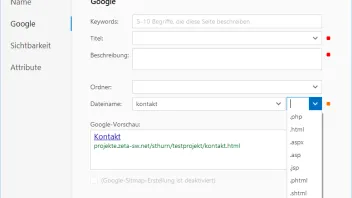
hallo danke aber ich finde die Seiteneigentschaften nicht ich bin komplett Laie ich fand nur Google über Einstellungen
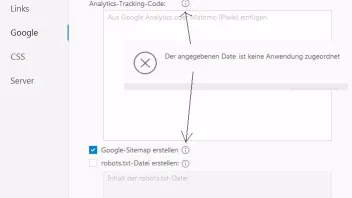
ich habe nichts verändert und meine Kommentare immer gleich eingegeben.
Danke
ok habe die Seite gefunden und bei Google .html angegeben hat leider nichts gebracht
Hallo,
ich kann das Problem leider so nicht nachvollziehen und ich denke, wir kommen so auch nicht weiter.
Am besten buchen Sie mal ein Support-Ticket und erstellen dann eine Anfrage. In dem Rahmen können wir dann evtl. per Fernwartung besser weiterhelfen.
Siehe: https://www.zeta-producer.com/de/premium-support.html
DexterzB Hallo, wenn du im Zeta Producer in der links befindlichen Verzeichnisstruktur mit der Mouse über den jeweiligen Seiteneintrag deiner Website ziehst, erscheint rechts daneben ein Zahnrad-Symbol.
Dort klickst du drauf, dann öffnet sich ein Kontextmenü. Hier wählst du dann den Punkt "Bearbeiten" und anschließend auf "Google", dann schaust in diesem Fenster, was beim Eintrag "Dateiname" rechts angezeigt wird (.html, .php etc.) und teilst dies hier im Forum mit.
ok habe die Seite gefunden und bei Google .html angegeben hat leider nichts gebracht
Hallo Dexter,
mach mal bitte am Montag ein Support-Ticket auf: https://www.zeta-producer.com/de/premium-support.html
Danke aber das ist mir keine 20 € wert kann mit dem Fehler leben
Sie haben noch kein Benutzerkonto auf unserer Seite? Registrieren Sie sich kostenlos und nehmen Sie an unserer Community teil!
Wenn Sie neu bei uns sind, hilft Ihnen unsere Hilfe-Seite dabei, sich im Forum zurechtzufinden. Dort erfahren Sie alles Wichtige, von der Registrierung bis hin zur Erstellung eigener Themen (Fragen).
Ohne Programmierkenntnisse gleich mit Zeta Producer loslegen. Layout auswählen, Text eingeben – fertig. Kostenloser Support und über 99% zufriedene Kunden. Überzeugen Sie sich selbst!