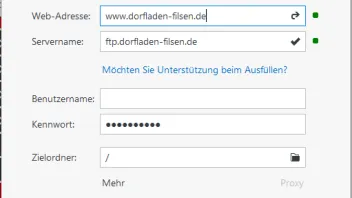
Veröffentlichung der Webseite nach Umstellung von ftp auf sftp nicht mehr möglich
-
-
Bei Servername müsste m.E. "ssh.irgendeinporovider.com" stehen.
Und unter "Veröffentlichen/Webserver konfigurieren" dann bei "Protokoll auswählen" "SFTP" einstellen.
Bei dir steht oben noch "FTP", Benutzername scheint auch zu fehlen...
Grüße
-
In älteren Programmversionen klicken sie in den FTP-Einstellungen unten links auf den Button „Neu“ und wählen dann das entsprechende Protokoll. Ältere Versionen unterstützen aber nicht alle modernen Verschlüsselungsalgorithmen, es kann also sein, dass es trotz umschalten auf das korrekte Protokoll nicht funktioniert. In dem Fall bliebe weiterhin die Nutzung von unverschlüsseltem FTP oder ein Update auf die aktuelle Programmversion.
-
Habe meine Seite ebenfalls bei WEB.DE. Der Servername bei WEB nach Umstellung auf SFTP lautet: sftp://u7XXXXXXX@access-500XXXXXXX.webspace-host.com. Dieser wird jedoch in ZETA nicht akzeptiert (ungültiger Servername). Im meinem FTP-Programm komme ich jedoch mit diesem Servernamen problemlos auf den Server.
Alle Versuche, den Servernamen in geänderter Form einzugeben, enden im Nichts.
Was mache ich falsch?
Übrigens geht bei WEB jetzt kein normales FTP-Protokoll mehr. Die Rückzugsmöglichkeit fällt also aus.
Ich verwende ZETA Producer 14.3.3 Express
-
Vermutlich einfach das „sftp://„ weglassen.
-
Hier wird nur der Servername eingetragen, kein Protokoll, kein Benutzername und kein Passwort (also nur das nach dem @ Zeichen).
Da Version 14 schon älter ist und nicht alle modernen Verschlüsselungalorithmen unterstützt, kann es dann trotzdem noch zu Fehlern kommen. In dem Fall hilft dann ein Update auf Version 16.
-
Hallo zusammen,
danke für die Hinweise!
1. sftp:// weglassen -> Servername ungültig
2. alles nur nach dem @: grünes Licht! WEITER: Verbindungstest -> Failure Details:
Rebex.Net.SftpException
-----------------
Failure; Failure.
-----------------
bei ctcy.mpeu(hffs arm, Type arn)
bei ctcy.mpdv(String aog, ctdz aoh, Boolean aoi, ctch aoj)
bei Rebex.Net.Sftp.ypkm(ctdz ru, ctch rv, String rw, Stream rx, Int64 ry, Int64 rz, hetr sa)
bei Rebex.Net.Sftp.ypkl(ctdz ro, String rp, Stream rq, Int64 rr, Int64 rs, hetr rt)
bei Rebex.Net.Sftp.PutFile(Stream sourceStream, String remotePath)
bei ZetaProducerPublishing.Runtime.Protocols.SftpProtocol.SftpEngine.<>c__DisplayClass22_0.<DoSendFile>b__0() in c:\P\ZP\14.3\ZetaProducerPublishing\Source\Runtime\Protocols\SftpProtocol\SftpEngine.cs:Zeile 314.
bei ZetaProducerPublishing.Runtime.Protocols.SftpProtocol.SftpEngine.guardFtpCall(FtpCall call, HandleException handleException) in c:\P\ZP\14.3\ZetaProducerPublishing\Source\Runtime\Protocols\SftpProtocol\SftpEngine.cs:Zeile 859.
bei ZetaProducerPublishing.Runtime.Protocols.SftpProtocol.SftpEngine.DoSendFile(SendFileInformation information) in c:\P\ZP\14.3\ZetaProducerPublishing\Source\Runtime\Protocols\SftpProtocol\SftpEngine.cs:Zeile 288.
bei ZetaProducer.RuntimeBusinessLogic.Publishing.Testing.ConnectionTestController.doTestRunNormal(Cancelable cancelable, Boolean quickTestOnly) in c:\P\ZP\14.3\ZetaProducerMain\Source\Core\RuntimeBusinessLogic\Publishing\Testing\ConnectionTestController.cs:Zeile 113.
bei ZetaProducer.RuntimeBusinessLogic.Publishing.Testing.ConnectionTestController.Test(Cancelable cancelable, Boolean quickTestOnly, Boolean allowThrow) in c:\P\ZP\14.3\ZetaProducerMain\Source\Core\RuntimeBusinessLogic\Publishing\Testing\ConnectionTestController.cs:Zeile 47.
SftpException
{
Status=ProtocolError,
Code=Failure,
Transferred=0,
RemotePath=null,
LocalPath=null,
ProblemType=0,
Status=ProtocolError,
ProtocolCode="4",
ProtocolMessage="Failure",
Message="Failure; Failure.",
Data=
[
"SftpStatus" = ProtocolError
"SftpCode" = Failure
"ProtocolCode" = "4"
"ProtocolMessage" = "Failure"
"Status" = ProtocolError
]
,
InnerException=null,
TargetSite=RuntimeMethodInfo: mpeu,
StackTrace=" bei ctcy.mpeu(hffs arm, Type arn)\\r\\n bei ctcy.mpdv(String aog, ctdz aoh, Boolean aoi, ctch aoj)\\r\\n bei Rebex.Net.Sftp.ypkm(ctdz ru, ctch rv, String rw, Stream rx, Int64 ry, Int64 rz, hetr sa)\\r\\n bei Rebex.Net.Sftp.ypkl(ctdz ro, String rp, Stream rq, Int64 rr, Int64 rs, hetr rt)\\r\\n bei Rebex.Net.Sftp.PutFile(Stream sourceStream, String remotePath)\\r\\n bei ZetaProducerPublishing.Runtime.Protocols.SftpProtocol.SftpEngine.<>c__DisplayClass22_0.<DoSendFile>b__0() in c:\\P\\ZP\\14.3\\ZetaProducerPublishing\\Source\\Runtime\\Protocols\\SftpProtocol\\SftpEngine.cs:Zeile 314.\\r\\n bei ZetaProducerPublishing.Runtime.Protocols.SftpProtocol.SftpEngine.guardFtpCall(FtpCall call, HandleException handleException) in c:\\P\\ZP\\14.3\\ZetaProducerPublishing\\Source\\Runtime\\Protocols\\SftpProtocol\\SftpEngine.cs:Zeile 859.\\r\\n bei ZetaProducerPublishing.Runtime.Protocols.SftpProtocol.SftpEngine.DoSendFile(SendFileInformation information) in c:\\P\\ZP\\14.3\\ZetaProducerPublishing\\Source\\Runtime\\Protocols\\SftpProtocol\\SftpEngine.cs:Zeile 288.\\r\\n bei ZetaProducer.RuntimeBusinessLogic.Publishing.Testing.ConnectionTestController.doTestRunNormal(Cancelable cancelable, Boolean quickTestOnly) in c:\\P\\ZP\\14.3\\ZetaProducerMain\\Source\\Core\\RuntimeBusinessLogic\\Publishing\\Testing\\ConnectionTestController.cs:Zeile 113.\\r\\n bei ZetaProducer.RuntimeBusinessLogic.Publishing.Testing.ConnectionTestController.Test(Cancelable cancelable, Boolean quickTestOnly, Boolean allowThrow) in c:\\P\\ZP\\14.3\\ZetaProducerMain\\Source\\Core\\RuntimeBusinessLogic\\Publishing\\Testing\\ConnectionTestController.cs:Zeile 47.",
HelpLink=null,
Source="Rebex.Sftp",
HResult=-2146233088
}
Was bedeutet das? Wo liegt der Fehler? Ich lese etwas von Protokoll-Fehlern. Mit meinem FTP-Programm (Speed-Commander) gibt es keine Probleme
Danke im Voraus schon Mal
Chris
-
da wirkt sich jetzt vermutlich aus, dass die V 14 den von web.de verwendeten Algorithmus nicht unterstützt, siehe:
Da Version 14 schon älter ist und nicht alle modernen Verschlüsselungalorithmen unterstützt, kann es dann trotzdem noch zu Fehlern kommen. In dem Fall hilft dann ein Update auf Version 16.
-
Zu der Fehlermeldung existieren bereits eine Menge Beiträge: https://community.zeta-producer.com/wcf/search-res…Failure+Failure
Jetzt mitmachen!
Sie haben noch kein Benutzerkonto auf unserer Seite? Registrieren Sie sich kostenlos und nehmen Sie an unserer Community teil!