
Kleines Problem beim Erstellen

  • Hallo Zusammen,

    ich habe für meine Website den Code für Google-Analytics erneuert. Das habe ich in dem entsprechenden Feld bei Einstellungen gemacht.

    Danach habe ich die komplette Website neu erstellen lassen.

    Wenn ich danach in den Quielltext der Seiten schaue, steht dort seltsamerweise der alte Code drin obwohl der nicht in dem Feld "Google" enthalten ist. Von dem neuen Code ist im neuen Quelltext der Seite nichts zu sehen.

    Mach ich hiert etwas falsch ? Ich meine, das hätte in der Vergangenheit immer so funktioniert.

    Schöne Grüsse

    Rolf Bitz
  • Sehr geehrtes Zeta-Team,

    leider hilft das Cache-Löschen nicht weiter.

    Es liegt immer noch die gleiche Situation vor.

    Schöne Grüsse

    Rolf Bitz

  • Um unsere Firmenwebsite apt-huerth.de.

    Aber der neue Stand ist noch nichtz online weil der Code in der Output-Datei schon nicht so ist wie ich es haben möchte.

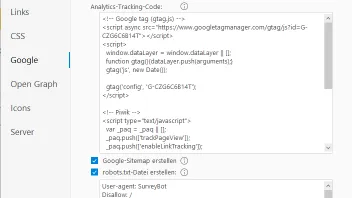
    Hier das Eingabefenster:

    Und hier der Quellcode aus der index-Datei nach dem Erstellen:

    <!DOCTYPE html>

    <html prefix="og: https://ogp.me/ns#" class="no-js responsivelayout supportsbreakout" lang="de" data-zpdebug="false" data-ptr="" data-pagename="Unternehmen">

    <head>

    <meta http-equiv="content-type" content="text/html; charset=utf-8" />

    <meta name="viewport" content="width=device-width, initial-scale=1.0" />

    <meta name="description" content="APT: renommierter Lecktestger&#228;tehersteller in Deutschland &amp; Profi f&#252;r Dichtheitspr&#252;fungen. Jetzt mehr &#252;ber unser hochwertiges Lecktestger&#228;t erfahren!" />

    <meta name="keywords" content="Lecktestger&#228;te,Dichtheitspr&#252;fungen,Differenzdruckmessung,Dichtheitspr&#252;fung mit Luft,Dichtigkeitspr&#252;fger&#228;t,Dichtheitspr&#252;fger&#228;te,Durchflussmessung mit Luft" />

    <meta name="generator" content="Zeta Producer 16.8.6.0, ZP16P, 04.06.2024 11:28:10" />

    <meta name="robots" content="index, follow" />

    <title>Top-Lecktestger&#228;te &amp; mehr f&#252;r zuverl&#228;ssige Dichtheitspr&#252;fung</title>

    <meta property="og:type" content="website">

    <meta property="og:title" content="Top-Lecktestger&#228;te &amp; mehr f&#252;r zuverl&#228;ssige Dichtheitspr&#252;fung">

    <meta property="og:description" content="APT: renommierter Lecktestger&#228;tehersteller in Deutschland &amp; Profi f&#252;r Dichtheitspr&#252;fungen. Jetzt mehr &#252;ber unser hochwertiges Lecktestger&#228;t erfahren!">

    <meta property="og:url" content="https://www.apt-huerth.de/index.html">

    <meta property="twitter:card" content="summary_large_image">

    <meta property="twitter:title" content="Top-Lecktestger&#228;te &amp; mehr f&#252;r zuverl&#228;ssige Dichtheitspr&#252;fung">

    <meta property="twitter:description" content="APT: renommierter Lecktestger&#228;tehersteller in Deutschland &amp; Profi f&#252;r Dichtheitspr&#252;fungen. Jetzt mehr &#252;ber unser hochwertiges Lecktestger&#228;t erfahren!">

    <script>

    document.documentElement.className = document.documentElement.className.replace(/no-js/g, 'js');

    </script>

    <link rel="stylesheet" href="assets/bundle.css?v=638532761407484819" />

    <link rel="stylesheet" href="assets/bundle-print.css?v=638532761407464808" media="print" />

    <script src="assets/bundle.js?v=638532761407514829"></script>

    <link rel="canonical" href="https://www.apt-huerth.de/" />

    <link rel="alternate" hreflang="de" href="https://www.apt-huerth.de/" />

    <link rel="alternate" hreflang="en" href="https://www.apt-huerth.de/apt_eng/company.html" />

    <link rel="alternate" hreflang="fr" href="https://www.apt-huerth.de/apt_fra/l-enterprise.html" />


    <link rel="canonical" href="https://www.apt-huerth.de/index.html" />

    <link rel="preload" href="assets/fonts/fontawesome-webfont.woff2?v=4.7.0" as="font" type="font/woff2" crossorigin />

    <style>

    media screen and (max-width: 640px) {

    table.zptabledata th, table.zptabledata td {

    white-space: normal;

    }

    }

    </style>

    <style>

    .navbar .nav > li > a {

    border: 1px solid #003399;

    margin:0 5px 0 0;

    }

    .navbar {

    padding: 20px;

    }

    #banner{

    padding-top: 0;

    padding-bottom: 0;

    }

    </style>

    <style>

    #tooltip

    {

    font-family: Ubuntu, sans-serif;

    font-size: 0.875em;

    text-align: center;

    text-shadow: 0 1px rgba( 0, 0, 0, .5 );

    line-height: 1.5;

    color: #fff;

    background: #333;

    background: -webkit-gradient( linear, left top, left bottom, from( rgba( 0, 0, 0, .6 ) ), to( rgba( 0, 0, 0, .8 ) ) );

    background: -webkit-linear-gradient( top, rgba( 0, 0, 0, .6 ), rgba( 0, 0, 0, .8 ) );

    background: -moz-linear-gradient( top, rgba( 0, 0, 0, .6 ), rgba( 0, 0, 0, .8 ) );

    background: -ms-radial-gradient( top, rgba( 0, 0, 0, .6 ), rgba( 0, 0, 0, .8 ) );

    background: -o-linear-gradient( top, rgba( 0, 0, 0, .6 ), rgba( 0, 0, 0, .8 ) );

    background: linear-gradient( top, rgba( 0, 0, 0, .6 ), rgba( 0, 0, 0, .8 ) );

    -webkit-border-radius: 5px;

    -moz-border-radius: 5px;

    border-radius: 5px;

    border-top: 1px solid #fff;

    -webkit-box-shadow: 0 3px 5px rgba( 0, 0, 0, .3 );

    -moz-box-shadow: 0 3px 5px rgba( 0, 0, 0, .3 );

    box-shadow: 0 3px 5px rgba( 0, 0, 0, .3 );

    position: absolute;

    z-index: 100;

    padding: 15px;

    }

    #tooltip:after

    {

    width: 0;

    height: 0;

    border-left: 10px solid transparent;

    border-right: 10px solid transparent;

    border-top: 10px solid #333;

    border-top-color: rgba( 0, 0, 0, .7 );

    content: '';

    position: absolute;

    left: 50%;

    bottom: -10px;

    margin-left: -10px;

    }

    #tooltip.top:after

    {

    border-top-color: transparent;

    border-bottom: 10px solid #333;

    border-bottom-color: rgba( 0, 0, 0, .6 );

    top: -20px;

    bottom: auto;

    }

    #tooltip.left:after

    {

    left: 10px;

    margin: 0;

    }

    #tooltip.right:after

    {

    right: 10px;

    left: auto;

    margin: 0;

    }

    </style>


    <!-- Webfonts -->

    <script>

    // if after 1000ms we haven't got webfonts, show the user something, a FOUT is better than nothing

    // http://kevindew.me/post/470524535…nt-loader-fails

    setTimeout(function() {

    // you can have the webfont.js cached but still have no classes fire and you will have a window.WebFontConfig object

    if ( ! ("WebFont" in window)) {

    // non wfl loader class name because their events could still fire

    document.getElementsByTagName("html")[0].className += " wf-fail";

    }

    }, 1000);

    WebFontConfig = {

    custom: {

    families: [ 'Open+Sans:300,400,600' ],

    urls: ['media/fonts/zp-webfonts.css?v=530804417']

    }

    };

    </script>

    <script src="assets/js/webfont/1.6.28/webfont-local.js"></script>


    <link rel="alternate" type="application/rss+xml" title="APT GMBH" href="rss-feed.xml" />


    <link class="zpfaviconmeta" rel="shortcut icon" type="image/x-icon" href="assets/pmd02_32.ico?v=2021070601" />

    <script type='text/javascript'>

    window.smartlook||(function(d) {

    var o=smartlook=function(){ o.api.push(arguments)},h=d.getElementsByTagName('head')[0];

    var c=d.createElement('script');o.api=new Array();c.async=true;c.type='text/javascript';

    c.charset='utf-8';c.src='https://rec.smartlook.com/recorder.js%27;h.appendChild(c);

    })(document);

    smartlook('init', '6ae0afff1a284e178645e4462f3cfcdc73ca78c2');

    </script>

    <!-- Piwik -->

    <script type="text/javascript">

    var _paq = _paq || [];

    _paq.push(['trackPageView']);

    _paq.push(['enableLinkTracking']);

    (function() {

    var u="https://www.apt-huerth.de/piwik/";

    _paq.push(['setTrackerUrl', u+'piwik.php']);

    _paq.push(['setSiteId', 1]);

    var d=document, g=d.createElement('script'), s=d.getElementsByTagName('script')[0];

    g.type='text/javascript'; g.async=true; g.defer=true; g.src=u+'piwik.js'; s.parentNode.insertBefore(g,s);

    })();

    </script>

    <noscript><p><img src="https://www.apt-huerth.de/piwik/piwik.php?idsite=1" style="border:0;" alt="" /></p></noscript>

    <!-- End Piwik Code -->

    <script>

    (function(i,s,o,g,r,a,m){i['GoogleAnalyticsObject']=r;i[r]=i[r]||function(){

    (i[r].q=i[r].q||[]).push(arguments)},i[r].l=1*new Date();a=s.createElement(o),

    m=s.getElementsByTagName(o)[0];a.async=1;a.src=g;m.parentNode.insertBefore(a,m)

    })(window,document,'script','//http://www.google-analytics.com/analytics.js%27,%27ga');

    ga('create', 'UA-946137-1', 'auto');

    ga('set', 'anonymizeIp', true);

    ga('send', 'pageview');

    </script>


    <style>

    .zpSidebarIcons6860 {right: -80px;top: 50%;transform: translateY(-50%);}#zpSidebarIcons6860.zpSidebarIcons6860 a {right: 0;flex-direction: row;border-radius: 3px 0 0 3px !important;height: 45px;margin-bottom: 1px !important;color: #FFFFFF !important;background-color: #0082D7 !important;border-width: 1px !important;border-color: #0082D7 !important;box-shadow: 0 0 3px rgba(0, 0, 0, 0.1) !important;} media (hover: hover) {#zpSidebarIcons6860.zpSidebarIcons6860 a:hover {right: 80px;}}#zpSidebarIcons6860.zpSidebarIcons6860 a:hover {color: #FFFFFF !important;background-color: #0076C4 !important;border-color: #0076C4 !important;box-shadow: 0 0 3px rgba(0, 0, 0, 0.2) !important;}.zpSidebarIcons6860 a span.zpSidebarIcon {width: 45px;font-size: 1em;}.zpSidebarIcons6860 a span.zpSidebarText {justify-content: flex-start;font-size: 0.8em;width: 80px;} media (max-width: 479px) {.zpSidebarIcons6860 a span.zpSidebarIcon {width: 23px;font-size: 0.8em;}.zpSidebarIcons6860 a span.zpSidebarText {font-size: 0.8em;}}

    </style><style>

    #a5730.zpwButton , #a5730.zpwButton p{text-align: center;}

    </style>


    <style>

    #searchform{

    position: absolute;

    z-index: 1;

    right: 0;

    }

    .navbar ul.nav{

    margin-right: 40px;

    }

    media (max-width: 979px) {

    #searchform{

    width: 100%;

    margin-left: auto;

    margin-right: auto;

    padding: 0 15px;

    position: relative;

    left: auto;

    right: auto;

    top: auto;

    box-sizing: border-box;

    }

    #searchfield {

    max-width: 100% !important;

    width: 100%;

    height: 30px;

    float: none;

    margin: 0;

    position: relative;

    box-sizing: border-box;

    }

    #searchform:hover #searchfield, #searchform:focus #searchfield, #searchfield:hover, #searchfield:focus{

    width: inherit;

    min-width: inherit;

    padding: inherit;

    }

    #searchbutton{

    right: 21px;

    }

    }

    </style>


    </head>

    Im Code habe ich den Bereich Fett markiert wie er in der Datei auftaucht, obwohl ich das geändert habe.

    Ich hab dafür keine erklärung.

    Schöne Grüsse

    Rolf Bitz

Jetzt mitmachen!

Sie haben noch kein Benutzerkonto auf unserer Seite? Registrieren Sie sich kostenlos und nehmen Sie an unserer Community teil!