


Einfach toll der Support hier, danke.
Problem gelöst, es lag an Schreibrechten und einem vollen FTP Server.
Beiträge von Drangmeister
-
-
Hanabi : Also ich habe jetzt den Server frei geräumt und einen Ordner in Filezilla erstellt. In diesen Ordner konnte ich die Dateien per Zeta laden, es gab keine Fehlermeldung mehr. Ich habe die Berechtigungen wie vorgeschlagen geändert und bei Strato eine interne Umleitung zu diesem Ordner eigerichtet. Die Adresse ist http://www.fbz-wiltingen.de.
Der Fehler 403 Forbidden zeigt sich leider beim Aufrufen der Internetseite. Was kann ich tun?
Vielen Dank vorab, ich habe das Gefühl dass es voran geht.
€dit: Da ich vermutete dass es an den Berechtigungen liegt, habe ich die Berechtigungen auf 755 gestellt. Jetzt zeigt es die Seite an

-
€dit. Das ist auch neu:
Und scheinbar habe ich so viel verändert, dass die ursprüngliche Seite, http://www.dobowi.de nun auch nicht mehr erreichbar ist

Ich vermute dass ich bei dem ganzen Chaos einfach mal den Server leer räumen und alles neu hochladen sollte, oder? -
Ich bin sehr froh dass eine Lösung in Aussicht ist.
Zu 1.1: Ich habe keine Häkchen zur Auswahl
1.2 ist erledigt.
2. Es wurde noch nichts hochgeladen.
3. Ich habe nach meinem letzten Post eine SSL Verschlüsselung beantragt, sie ist bei Strato scheinbar nicht standardmäßig vorhanden. Jetzt ist sie aber drin.
4. Eine Veränderung nachdem ich es nochmal versucht habe: AUTH not supported.
Rebex.Net.FtpException
-----------------
AUTH not supported (500).
-----------------
bei Rebex.Net.Ftp.ojmm(TlsParameters ff, FtpSecureUpgradeType fg)
bei Rebex.Net.Ftp.ojmd(String ew, Int32 ex, TlsParameters ey, SslMode ez, FtpSecureUpgradeType fa)
bei Rebex.Net.Ftp.ojmc(String er, Int32 es, TlsParameters et, SslMode eu, FtpSecureUpgradeType ev)
bei ZetaProducerPublishing.Runtime.Protocols.FtpProtocol.FtpEngine.<DoOpen>b__33_0() in c:\P\ZP\14.3\ZetaProducerPublishing\Source\Runtime\Protocols\FtpProtocol\FtpEngine.cs:Zeile 423.
bei ZetaProducerPublishing.Runtime.Protocols.FtpProtocol.ActivePassiveDetectorGuard.doGuard() in c:\P\ZP\14.3\ZetaProducerPublishing\Source\Runtime\Protocols\FtpProtocol\ActivePassiveDetectorGuard.cs:Zeile 89.
bei ZetaProducerPublishing.Runtime.Protocols.FtpProtocol.ActivePassiveDetectorGuard..ctor(IActivePassiveDetectorHolder holder, ActivePassiveGuardDelegate guardDelegate) in c:\P\ZP\14.3\ZetaProducerPublishing\Source\Runtime\Protocols\FtpProtocol\ActivePassiveDetectorGuard.cs:Zeile 27.
bei ZetaProducerPublishing.Runtime.Protocols.FtpProtocol.FtpEngine.DoOpen(OpenInformation information) in c:\P\ZP\14.3\ZetaProducerPublishing\Source\Runtime\Protocols\FtpProtocol\FtpEngine.cs:Zeile 465.
bei ZetaProducer.RuntimeBusinessLogic.Publishing.Testing.ConnectionTestController.doTestRunNormal(Cancelable cancelable, Boolean quickTestOnly) in c:\P\ZP\14.3\ZetaProducerMain\Source\Core\RuntimeBusinessLogic\Publishing\Testing\ConnectionTestController.cs:Zeile 89.
bei ZetaProducer.RuntimeBusinessLogic.Publishing.Testing.ConnectionTestController.Test(Cancelable cancelable, Boolean quickTestOnly, Boolean allowThrow) in c:\P\ZP\14.3\ZetaProducerMain\Source\Core\RuntimeBusinessLogic\Publishing\Testing\ConnectionTestController.cs:Zeile 47.
FtpException
{
Status=ProtocolError,
Response=FtpResponse
{
Raw="500 AUTH not supported.\\r\\n",
Description="AUTH not supported.",
Code=500,
Group=5
},
Transfered=0,
Transferred=0,
RemotePath=null,
LocalPath=null,
ProblemType=0,
Status=ProtocolError,
ProtocolCode="500",
ProtocolMessage="AUTH not supported.",
Message="AUTH not supported (500).",
Data=
[
"ProtocolCode" = "500"
"ProtocolMessage" = "AUTH not supported."
"FtpResponse" = FtpResponse
{
Raw="500 AUTH not supported.\\r\\n",
Description="AUTH not supported.",
Code=500,
Group=5
}
"FtpStatus" = ProtocolError
"Status" = ProtocolError
]
,
InnerException=null,
TargetSite=RuntimeMethodInfo: ojmm,
StackTrace=" bei Rebex.Net.Ftp.ojmm(TlsParameters ff, FtpSecureUpgradeType fg)\\r\\n bei Rebex.Net.Ftp.ojmd(String ew, Int32 ex, TlsParameters ey, SslMode ez, FtpSecureUpgradeType fa)\\r\\n bei Rebex.Net.Ftp.ojmc(String er, Int32 es, TlsParameters et, SslMode eu, FtpSecureUpgradeType ev)\\r\\n bei ZetaProducerPublishing.Runtime.Protocols.FtpProtocol.FtpEngine.<DoOpen>b__33_0() in c:\\P\\ZP\\14.3\\ZetaProducerPublishing\\Source\\Runtime\\Protocols\\FtpProtocol\\FtpEngine.cs:Zeile 423.\\r\\n bei ZetaProducerPublishing.Runtime.Protocols.FtpProtocol.ActivePassiveDetectorGuard.doGuard() in c:\\P\\ZP\\14.3\\ZetaProducerPublishing\\Source\\Runtime\\Protocols\\FtpProtocol\\ActivePassiveDetectorGuard.cs:Zeile 89.\\r\\n bei ZetaProducerPublishing.Runtime.Protocols.FtpProtocol.ActivePassiveDetectorGuard..ctor(IActivePassiveDetectorHolder holder, ActivePassiveGuardDelegate guardDelegate) in c:\\P\\ZP\\14.3\\ZetaProducerPublishing\\Source\\Runtime\\Protocols\\FtpProtocol\\ActivePassiveDetectorGuard.cs:Zeile 27.\\r\\n bei ZetaProducerPublishing.Runtime.Protocols.FtpProtocol.FtpEngine.DoOpen(OpenInformation information) in c:\\P\\ZP\\14.3\\ZetaProducerPublishing\\Source\\Runtime\\Protocols\\FtpProtocol\\FtpEngine.cs:Zeile 465.\\r\\n bei ZetaProducer.RuntimeBusinessLogic.Publishing.Testing.ConnectionTestController.doTestRunNormal(Cancelable cancelable, Boolean quickTestOnly) in c:\\P\\ZP\\14.3\\ZetaProducerMain\\Source\\Core\\RuntimeBusinessLogic\\Publishing\\Testing\\ConnectionTestController.cs:Zeile 89.\\r\\n bei ZetaProducer.RuntimeBusinessLogic.Publishing.Testing.ConnectionTestController.Test(Cancelable cancelable, Boolean quickTestOnly, Boolean allowThrow) in c:\\P\\ZP\\14.3\\ZetaProducerMain\\Source\\Core\\RuntimeBusinessLogic\\Publishing\\Testing\\ConnectionTestController.cs:Zeile 47.",
HelpLink=null,
Source="Rebex.Ftp",
HResult=-2146233088
}
-
€dit: Sobald ich einen Ordner auf dem FTP Server erstellen will, sagt er auch 505 Permission denied. Unser Server liegt bei Strato. Ich habe das Masterpasswort eingegeben.
-
Vielen Dank schonmal für die schnelle Antwort. Der Zielordner hat die passende Berechtigung. Ich habe sogar kurz auf Berechtigung für alle gestellt und es kam der gleiche Fehler. Ich bin recht unbedarft in diesen Dingen, vielleicht mache ich etwas noch grundlegenderes falsch?
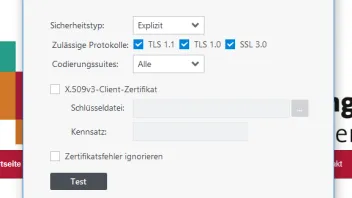
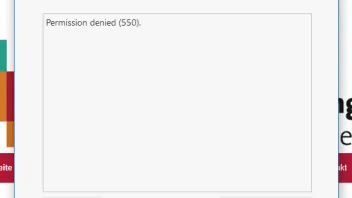
Hier ein paar Screenshots:
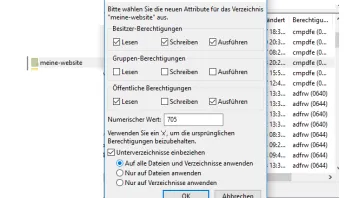
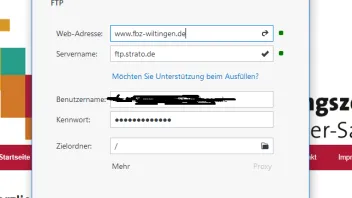
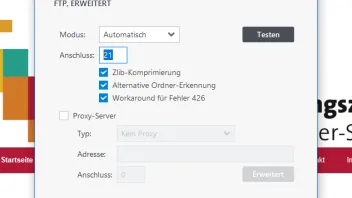
-
Ich habe den gleichen Fehler und bitte um Hilfe. Ich will eine zweite Webseite veröffentlichen und habe diese mit Zeta erstellt und die Zugangsdaten korrekt eingegeben.
Irgendwas klappt da nicht, ich weiß aber nicht weiter weil ich kein Webdesigner bin.
Rebex.Net.FtpException
-----------------
Permission denied (550).
-----------------
bei Rebex.Net.Ftp.ojlk(Int32 dg, Boolean dh)
bei Rebex.Net.Ftp.ojmz(String fz)
bei Rebex.Net.Ftp.ojop(String ke)
bei ZetaProducerPublishing.Runtime.Protocols.FtpProtocol.FtpEngine.doCreateDirectory(String remoteFolderPath) in c:\P\ZP\14.3\ZetaProducerPublishing\Source\Runtime\Protocols\FtpProtocol\FtpEngine.cs:Zeile 839.
bei ZetaProducerPublishing.Runtime.Protocols.FtpProtocol.FtpEngine.ensureDirectoryCreatedDuringSendFile(String remoteFolderPath, Boolean recursive) in c:\P\ZP\14.3\ZetaProducerPublishing\Source\Runtime\Protocols\FtpProtocol\FtpEngine.cs:Zeile 796.
bei ZetaProducerPublishing.Runtime.Protocols.FtpProtocol.FtpEngine.ensureDirectoryCreatedDuringSendFile(String remoteFolderPath, Boolean recursive) in c:\P\ZP\14.3\ZetaProducerPublishing\Source\Runtime\Protocols\FtpProtocol\FtpEngine.cs:Zeile 776.
bei ZetaProducerPublishing.Runtime.Protocols.FtpProtocol.FtpEngine.<>c__DisplayClass36_0.<DoSendFile>b__0() in c:\P\ZP\14.3\ZetaProducerPublishing\Source\Runtime\Protocols\FtpProtocol\FtpEngine.cs:Zeile 522.
bei ZetaProducerPublishing.Runtime.Protocols.FtpProtocol.FtpEngine.<>c__DisplayClass57_0.<guardFtpCall>b__0() in c:\P\ZP\14.3\ZetaProducerPublishing\Source\Runtime\Protocols\FtpProtocol\FtpEngine.cs:Zeile 1229.
bei ZetaProducerPublishing.Runtime.Protocols.FtpProtocol.ActivePassiveDetectorGuard..ctor(IActivePassiveDetectorHolder holder, ActivePassiveGuardDelegate guardDelegate) in c:\P\ZP\14.3\ZetaProducerPublishing\Source\Runtime\Protocols\FtpProtocol\ActivePassiveDetectorGuard.cs:Zeile 31.
bei ZetaProducerPublishing.Runtime.Protocols.FtpProtocol.FtpEngine.guardFtpCall(FtpCall call, HandleException handleException) in c:\P\ZP\14.3\ZetaProducerPublishing\Source\Runtime\Protocols\FtpProtocol\FtpEngine.cs:Zeile 1308.
bei ZetaProducerPublishing.Runtime.Protocols.FtpProtocol.FtpEngine.DoSendFile(SendFileInformation information) in c:\P\ZP\14.3\ZetaProducerPublishing\Source\Runtime\Protocols\FtpProtocol\FtpEngine.cs:Zeile 520.
bei ZetaProducer.RuntimeBusinessLogic.Publishing.Requirements.WebServerRequirementsTestController.createFoldersAndSetPermissions(PhpRequiredCapabilities capabilities, String serverFolder, BasePublishingEngine publishingEngine) in c:\P\ZP\14.3\ZetaProducerMain\Source\Core\RuntimeBusinessLogic\Publishing\Requirements\WebServerRequirementsTestController.cs:Zeile 144.
bei ZetaProducer.RuntimeBusinessLogic.Publishing.Requirements.WebServerRequirementsTestController.doTest(String serverFolder, BasePublishingEngine publishingEngine, Cancelable cancelable, PhpRequiredCapabilities reqs, WebServerAvailableCapabilities result) in c:\P\ZP\14.3\ZetaProducerMain\Source\Core\RuntimeBusinessLogic\Publishing\Requirements\WebServerRequirementsTestController.cs:Zeile 75.
bei ZetaProducer.RuntimeBusinessLogic.Publishing.Requirements.WebServerRequirementsTestController.Test(String serverFolder, BasePublishingEngine publishingEngine, Cancelable cancelable) in c:\P\ZP\14.3\ZetaProducerMain\Source\Core\RuntimeBusinessLogic\Publishing\Requirements\WebServerRequirementsTestController.cs:Zeile 49.
bei ZetaProducer.RuntimeBusinessLogic.Publishing.Testing.ConnectionTestController.doTestRunNormal(Cancelable cancelable, Boolean quickTestOnly) in c:\P\ZP\14.3\ZetaProducerMain\Source\Core\RuntimeBusinessLogic\Publishing\Testing\ConnectionTestController.cs:Zeile 136.
bei ZetaProducer.RuntimeBusinessLogic.Publishing.Testing.ConnectionTestController.Test(Cancelable cancelable, Boolean quickTestOnly, Boolean allowThrow) in c:\P\ZP\14.3\ZetaProducerMain\Source\Core\RuntimeBusinessLogic\Publishing\Testing\ConnectionTestController.cs:Zeile 47.
FtpException
{
Status=ProtocolError,
Response=FtpResponse
{
Raw="550 Permission denied.\\r\\n",
Description="Permission denied.",
Code=550,
Group=5
},
Transfered=0,
Transferred=0,
RemotePath=null,
LocalPath=null,
ProblemType=0,
Status=ProtocolError,
ProtocolCode="550",
ProtocolMessage="Permission denied.",
Message="Permission denied (550).",
Data=
[
"ProtocolCode" = "550"
"ProtocolMessage" = "Permission denied."
"FtpResponse" = FtpResponse
{
Raw="550 Permission denied.\\r\\n",
Description="Permission denied.",
Code=550,
Group=5
}
"FtpStatus" = ProtocolError
"Status" = ProtocolError
]
,
InnerException=null,
TargetSite=RuntimeMethodInfo: ojlk,
StackTrace=" bei Rebex.Net.Ftp.ojlk(Int32 dg, Boolean dh)\\r\\n bei Rebex.Net.Ftp.ojmz(String fz)\\r\\n bei Rebex.Net.Ftp.ojop(String ke)\\r\\n bei ZetaProducerPublishing.Runtime.Protocols.FtpProtocol.FtpEngine.doCreateDirectory(String remoteFolderPath) in c:\\P\\ZP\\14.3\\ZetaProducerPublishing\\Source\\Runtime\\Protocols\\FtpProtocol\\FtpEngine.cs:Zeile 839.\\r\\n bei ZetaProducerPublishing.Runtime.Protocols.FtpProtocol.FtpEngine.ensureDirectoryCreatedDuringSendFile(String remoteFolderPath, Boolean recursive) in c:\\P\\ZP\\14.3\\ZetaProducerPublishing\\Source\\Runtime\\Protocols\\FtpProtocol\\FtpEngine.cs:Zeile 796.\\r\\n bei ZetaProducerPublishing.Runtime.Protocols.FtpProtocol.FtpEngine.ensureDirectoryCreatedDuringSendFile(String remoteFolderPath, Boolean recursive) in c:\\P\\ZP\\14.3\\ZetaProducerPublishing\\Source\\Runtime\\Protocols\\FtpProtocol\\FtpEngine.cs:Zeile 776.\\r\\n bei ZetaProducerPublishing.Runtime.Protocols.FtpProtocol.FtpEngine.<>c__DisplayClass36_0.<DoSendFile>b__0() in c:\\P\\ZP\\14.3\\ZetaProducerPublishing\\Source\\Runtime\\Protocols\\FtpProtocol\\FtpEngine.cs:Zeile 522.\\r\\n bei ZetaProducerPublishing.Runtime.Protocols.FtpProtocol.FtpEngine.<>c__DisplayClass57_0.<guardFtpCall>b__0() in c:\\P\\ZP\\14.3\\ZetaProducerPublishing\\Source\\Runtime\\Protocols\\FtpProtocol\\FtpEngine.cs:Zeile 1229.\\r\\n bei ZetaProducerPublishing.Runtime.Protocols.FtpProtocol.ActivePassiveDetectorGuard..ctor(IActivePassiveDetectorHolder holder, ActivePassiveGuardDelegate guardDelegate) in c:\\P\\ZP\\14.3\\ZetaProducerPublishing\\Source\\Runtime\\Protocols\\FtpProtocol\\ActivePassiveDetectorGuard.cs:Zeile 31.\\r\\n bei ZetaProducerPublishing.Runtime.Protocols.FtpProtocol.FtpEngine.guardFtpCall(FtpCall call, HandleException handleException) in c:\\P\\ZP\\14.3\\ZetaProducerPublishing\\Source\\Runtime\\Protocols\\FtpProtocol\\FtpEngine.cs:Zeile 1308.\\r\\n bei ZetaProducerPublishing.Runtime.Protocols.FtpProtocol.FtpEngine.DoSendFile(SendFileInformation information) in c:\\P\\ZP\\14.3\\ZetaProducerPublishing\\Source\\Runtime\\Protocols\\FtpProtocol\\FtpEngine.cs:Zeile 520.\\r\\n bei ZetaProducer.RuntimeBusinessLogic.Publishing.Requirements.WebServerRequirementsTestController.createFoldersAndSetPermissions(PhpRequiredCapabilities capabilities, String serverFolder, BasePublishingEngine publishingEngine) in c:\\P\\ZP\\14.3\\ZetaProducerMain\\Source\\Core\\RuntimeBusinessLogic\\Publishing\\Requirements\\WebServerRequirementsTestController.cs:Zeile 144.\\r\\n bei ZetaProducer.RuntimeBusinessLogic.Publishing.Requirements.WebServerRequirementsTestController.doTest(String serverFolder, BasePublishingEngine publishingEngine, Cancelable cancelable, PhpRequiredCapabilities reqs, WebServerAvailableCapabilities result) in c:\\P\\ZP\\14.3\\ZetaProducerMain\\Source\\Core\\RuntimeBusinessLogic\\Publishing\\Requirements\\WebServerRequirementsTestController.cs:Zeile 75.\\r\\n bei ZetaProducer.RuntimeBusinessLogic.Publishing.Requirements.WebServerRequirementsTestController.Test(String serverFolder, BasePublishingEngine publishingEngine, Cancelable cancelable) in c:\\P\\ZP\\14.3\\ZetaProducerMain\\Source\\Core\\RuntimeBusinessLogic\\Publishing\\Requirements\\WebServerRequirementsTestController.cs:Zeile 49.\\r\\n bei ZetaProducer.RuntimeBusinessLogic.Publishing.Testing.ConnectionTestController.doTestRunNormal(Cancelable cancelable, Boolean quickTestOnly) in c:\\P\\ZP\\14.3\\ZetaProducerMain\\Source\\Core\\RuntimeBusinessLogic\\Publishing\\Testing\\ConnectionTestController.cs:Zeile 136.\\r\\n bei ZetaProducer.RuntimeBusinessLogic.Publishing.Testing.ConnectionTestController.Test(Cancelable cancelable, Boolean quickTestOnly, Boolean allowThrow) in c:\\P\\ZP\\14.3\\ZetaProducerMain\\Source\\Core\\RuntimeBusinessLogic\\Publishing\\Testing\\ConnectionTestController.cs:Zeile 47.",
HelpLink=null,
Source="Rebex.Ftp",
HResult=-2146233088
}
-
Ich habe die Home Version von Zeta 13 installiert und damit die besagte Internetseite heruntergeladen. Dann habe ich das faith layout aktiviert und eine backup Datei erstellt. Die Backup Datei habe ich in Zeta 12 geladen und schon war das Design auch dort verfügbar.
Ich werde allerdings in Zukunft auf Zeta 13 umsteigen wegen der Grid Fuktionen. Die sind nicht übertragbar.
-
Mit euren Ideen kam ich auf eine Lösung. Danke.
-
Danke vielmals!
-
Hallo Hanabi
Danke für den Hinweis. Ich verstehe nicht ganz was du meinst. Ich kann keine Spaltenbreiten ändern weder vorne noch hinten:
So sieht das unschön aus...
-
Ich habe es mit einer Tabelle gelöst. Ist zwar nicht so elegant aber es funktioniert...


-
Hallo liebe Leute
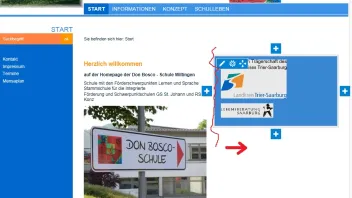
Aktuell sieht es so aus, als müsste ich auf ein anderes Design umsteigen. jetzt möchte ich ein Widget verkleinern. Im Handbuch habe ich zwar etwas dazu gefunden:
https://docs.zeta-producer.com/spaltenbreite-anpassen.html
Allerdings kriege ich das so nicht hin. Liegt es am Design?
Vielen Dank!!
-
Jochen, das könnte tatsächlich das Problem sein. Allerdings kommt bei der älteren Backup Datei folgender Fehler:
Ich merke, dass wir der Sache auf die Spur kommen...
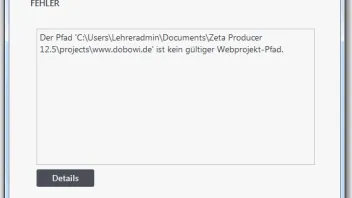
€dit: Details sagt folgendes:
System.Exception
-----------------
Der Pfad ist kein gültiger Webprojekt-Pfad.
-----------------
bei ZetaProducer.RuntimeBusinessLogic.Webbing.Projects.WebProject.doLoad(ZlpFileOrDirectoryInfo path)
bei ZetaProducer.RuntimeBusinessLogic.Webbing.Projects.WebProject.Load(ZlpFileOrDirectoryInfo path)
bei ZetaProducer.RuntimeBusinessLogic.BackupAndRestore.Restore.ProjectRestoreBackupController.ensureExternalTemplates(String destinationFolderPath)
bei ZetaProducer.RuntimeBusinessLogic.BackupAndRestore.Restore.ProjectRestoreBackupController.RestoreBackup(RestoreBackupInformation information)
bei ZetaProducer.Main.Backup.RestoreBackupSkinnedWizardForm.restoreBackgroundWorker_DoWork(Object sender, DoWorkEventArgs e)
bei System.ComponentModel.BackgroundWorker.OnDoWork(DoWorkEventArgs e)
bei System.ComponentModel.BackgroundWorker.WorkerThreadStart(Object argument)Exception
{
Message="Der Pfad ist kein gültiger Webprojekt-Pfad.",
Data=
[
]
,
InnerException=null,
TargetSite=RuntimeMethodInfo: doLoad,
StackTrace=" bei ZetaProducer.RuntimeBusinessLogic.Webbing.Projects.WebProject.doLoad(ZlpFileOrDirectoryInfo path)\\r\\n bei ZetaProducer.RuntimeBusinessLogic.Webbing.Projects.WebProject.Load(ZlpFileOrDirectoryInfo path)\\r\\n bei ZetaProducer.RuntimeBusinessLogic.BackupAndRestore.Restore.ProjectRestoreBackupController.ensureExternalTemplates(String destinationFolderPath)\\r\\n bei ZetaProducer.RuntimeBusinessLogic.BackupAndRestore.Restore.ProjectRestoreBackupController.RestoreBackup(RestoreBackupInformation information)\\r\\n bei ZetaProducer.Main.Backup.RestoreBackupSkinnedWizardForm.restoreBackgroundWorker_DoWork(Object sender, DoWorkEventArgs e)\\r\\n bei System.ComponentModel.BackgroundWorker.OnDoWork(DoWorkEventArgs e)\\r\\n bei System.ComponentModel.BackgroundWorker.WorkerThreadStart(Object argument)",
HelpLink=null,
Source="ZetaProducer.RuntimeBusinessLogic",
HResult=-2146233088
} -
@ Hanabi: Genau das ist mein Problem.
Wenn sich ein Zeta Supporter dazu äußern könnte, wäre ich überaus dankbar. Eigentlich war ich immer sehr zufrieden mit dem Produkt. -
Ich habe die 13er Version installiert, dort ist das faith Design verfügbar. Ich habe aber damals die 12er gekauft und dort funktionierte ebenso das faith design. Wenn ich nun die 12er installiere und meine Serien Nummer eingebe, wird das faith Design als nur für die Business Version angezeigt. Ich möchte aber keine 350 Euro für ein Design ausgeben, das mir eigentlich verfügbar sein sollte.
Kann ein Support dieses Problem bitte auflösen. Herzlichen Dank!
-
am anderen Rechner geht es mit der 13er Demo Home Version. Aber dafür habe ich keine 180€ Lizenz gekauft. Am gleichen pc kann die 12 das Design nicht öffnen.
Das muss doch behebbar sein.
-
Das ist ja verrückt. Ich versuche es noch an einem anderen Rechner.
-
Vielen Dank jedenfalls schon einmal.
-
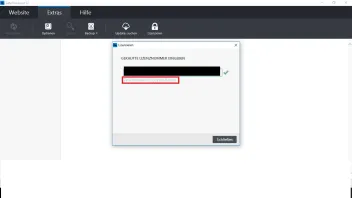
Der Inhalt kann nicht angezeigt werden, da er nicht mehr verfügbar ist. So sieht das bei mir aus 
-
Das habe ich gemacht. Ich dachte es liegt an der 13er Version. Dann bin ich alle Versionen von 9-13 durchgegangen. Dort war es immer nur für die business Klasse verfügbar. Ich habe 2014 die Express Version gekauft.
-
Guten Tag
Ich benutze zeta Producer 12 für eine Webseite. Nach einer neuaufsetzung des Computers musste ich zeta Producer neu installieren. Das Design faith wird mir nun als nur in der Business Version verfügbar angezeigt. Gibt es eine Möglichkeit das Design zu erhalten? Vorher konnte ich es benutzen und ohne das Design zerreißt sich meine ganze Darstellung .
Vielen Dank