Website veröffentlichen

  • Hallo zusammen, habe mit vor einigen Tagen die Software "Zeta Producer Business Vers. 17" zugelegt. Bin jetzt gerade in der Testphase und wollte meine Website veröffentlichen um zu gucken, wie sich das mit dem Schutz durch Passworteingabe am Monitor zeigt und funktioniert. Leider bekomme ich die Website erst garnicht übertragen, obwohl die Anmeldedaten alle richtig sind (mit meinem alten Programm funktioniert es noch einwandfrei). Mein Server läuft über one.com und da ist eigentlich immer alles unkompliziert, gibt es noch Einstellungen die ich berücksichtigen muss? Freue mich auf Antworten.

    MfG HeinzK

  • Stefan S 24. Februar 2026 um 18:17

    Hat das Thema freigeschaltet.
    • Offizieller Beitrag

    Hallo,

    hängen Sie bitte einen Screenshot der Veröffentlichungseinstellungen hier an. Vielleicht fällt uns da gleich etwas auf.

    Auch interessant wäre zu wissen, was genau passiert, wenn Sie aus Zeta Producer heraus veröffentlichen. Erhalten Sie da z.Bl eine Fehlermeldung?

  • Hallo Herr Stefan S.

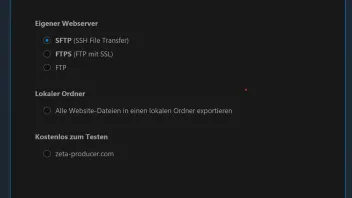
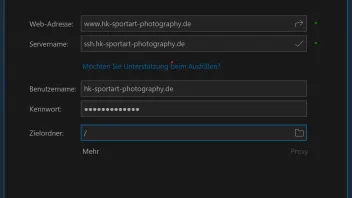
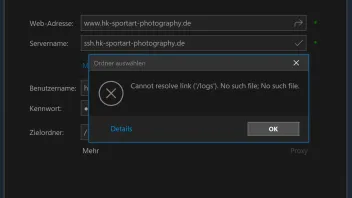
    ich füge mal mehrere Screenshots ein, damit man erkennen kann wie die einzelnen Fenster aussehen. Ich habe auch versucht die Website auf den Zeta Producer Testserver hochzuladen, hierfür war die Website wohl zu groß. Ich verwende als Grundlage das fertige Template aus den Branchenvorlagen "Ferienhaus & Hotel" und hier das Template "Stripe Responsive - Alpinlodge". Vielleicht hilft das ja auch weiter. Das Template passe ich dann so nach und nach an meine Bedürnisse an.

    Bild 1 Bild 2 Bild 3


    • Offizieller Beitrag

    Danke, wenn Sie in der Fehlermeldung bezgl. /logs auf den OK-Button klicken, dann sollte es eigentlich möglich sein, fortzufahren. Oder nicht?

    Da scheint ein Fehler bei der automatischen Ermittlung der verfügbaren Zielordner vorzuliegen, es sollte aber möglich sein, den Zielordner manuell ins Feld einzutragen.

  • Hallo zusammen,

    anbei die Details der Fehlermeldung zum o.g. Vorgang, ich hoffe es hilft Ihnen weiter. Freue mich auf eine Rückmeldung.

    ZetaProducerPublishing.Runtime.Main.SendFileException

    -----------------

    Failure; Failure.

    -----------------

    at ZetaProducerPublishing.Runtime.Protocols.SftpProtocol.SftpEngine.DoSendFile(SendFileInformation information) in c:\P\ukeim\zp-develop\ZetaProducerPublishing\Source\Runtime\Protocols\SftpProtocol\SftpEngine.cs:line 388
    at ZetaProducerPublishing.Runtime.Protocols.Base.BasePublishingEngine.SendFile(SendFileInformation information) in c:\P\ukeim\zp-develop\ZetaProducerPublishing\Source\Runtime\Protocols\Base\BasePublishingEngine.cs:line 73
    at ZetaProducer.RuntimeBusinessLogic.Publishing.Testing.ConnectionTestController.doTestRunNormal(Cancelable cancelable, Boolean quickTestOnly) in c:\P\ukeim\zp-develop\ZetaProducerMain\Source\Core\RuntimeBusinessLogic\Publishing\Testing\ConnectionTestController.cs:line 104
    at ZetaProducer.RuntimeBusinessLogic.Publishing.Testing.ConnectionTestController.Test(Cancelable cancelable, Boolean quickTestOnly, Boolean allowThrow) in c:\P\ukeim\zp-develop\ZetaProducerMain\Source\Core\RuntimeBusinessLogic\Publishing\Testing\ConnectionTestController.cs:line 30

    SendFileException
    {
    AlreadyProcessedFiles=String[]
    {
    Length=0,
    LongLength=0,
    Rank=1,
    ,
    IsReadOnly=False,
    IsFixedSize=True,
    IsSynchronized=False

    },
    TargetSite=RuntimeMethodInfo: DoSendFile,
    Message="Failure; Failure.",
    Data=
    [
    ]
    ,
    InnerException=SftpException
    {
    Status=ProtocolError,
    Code=Failure,
    Transferred=0,
    RemotePath=null,
    LocalPath=null,
    ProblemType=0,
    Status=ProtocolError,
    ProtocolCode="4",
    ProtocolMessage="Failure",
    TargetSite=RuntimeMethodInfo: fgwmv,
    Message="Failure; Failure.",
    Data=
    [
    "SftpStatus" = ProtocolError
    "SftpCode" = Failure
    "ProtocolCode" = "4"
    "ProtocolMessage" = "Failure"
    "Status" = ProtocolError
    ]
    ,
    InnerException=null,
    HelpLink=null,
    Source="Rebex.Sftp",
    HResult=-2146233088,
    StackTrace=" at sapfx.suzar.fgwmv(uwjnh p0, Type p1)\\r\\n at Rebex.Net.Sftp.onokt(xmcpf p0, kmmoj p1, String p2, Stream p3, Int64 p4, Int64 p5, hwjtu p6)\\r\\n at Rebex.Net.Sftp.rlxcf(xmcpf p0, String p1, Stream p2, Int64 p3, Int64 p4, hwjtu p5)\\r\\n at Rebex.Net.Sftp.PutFile(Stream sourceStream, String remotePath)\\r\\n at ZetaProducerPublishing.Runtime.Protocols.SftpProtocol.SftpEngine.<>c__DisplayClass24_1.<DoSendFile>b__0() in c:\\P\\ukeim\\zp-develop\\ZetaProducerPublishing\\Source\\Runtime\\Protocols\\SftpProtocol\\SftpEngine.cs:line 351\\r\\n at ZetaProducerPublishing.Runtime.Protocols.SftpProtocol.SftpEngine.guardFtpCall(FtpCall call, HandleException handleException) in c:\\P\\ukeim\\zp-develop\\ZetaProducerPublishing\\Source\\Runtime\\Protocols\\SftpProtocol\\SftpEngine.cs:line 882\\r\\n at ZetaProducerPublishing.Runtime.Protocols.SftpProtocol.SftpEngine.DoSendFile(SendFileInformation information) in c:\\P\\ukeim\\zp-develop\\ZetaProducerPublishing\\Source\\Runtime\\Protocols\\SftpProtocol\\SftpEngine.cs:line 326"
    },
    HelpLink=null,
    Source="ZetaProducerPublishing",
    HResult=-2146233088,
    StackTrace=" at ZetaProducerPublishing.Runtime.Protocols.SftpProtocol.SftpEngine.DoSendFile(SendFileInformation information) in c:\\P\\ukeim\\zp-develop\\ZetaProducerPublishing\\Source\\Runtime\\Protocols\\SftpProtocol\\SftpEngine.cs:line 388\\r\\n at ZetaProducerPublishing.Runtime.Protocols.Base.BasePublishingEngine.SendFile(SendFileInformation information) in c:\\P\\ukeim\\zp-develop\\ZetaProducerPublishing\\Source\\Runtime\\Protocols\\Base\\BasePublishingEngine.cs:line 73\\r\\n at ZetaProducer.RuntimeBusinessLogic.Publishing.Testing.ConnectionTestController.doTestRunNormal(Cancelable cancelable, Boolean quickTestOnly) in c:\\P\\ukeim\\zp-develop\\ZetaProducerMain\\Source\\Core\\RuntimeBusinessLogic\\Publishing\\Testing\\ConnectionTestController.cs:line 104\\r\\n at ZetaProducer.RuntimeBusinessLogic.Publishing.Testing.ConnectionTestController.Test(Cancelable cancelable, Boolean quickTestOnly, Boolean allowThrow) in c:\\P\\ukeim\\zp-develop\\ZetaProducerMain\\Source\\Core\\RuntimeBusinessLogic\\Publishing\\Testing\\ConnectionTestController.cs:line 30"
    }
    -->Failure; Failure.

    Rebex.Net.SftpException

    -----------------

    Failure; Failure.

    -----------------

    at sapfx.suzar.fgwmv(uwjnh p0, Type p1)
    at Rebex.Net.Sftp.onokt(xmcpf p0, kmmoj p1, String p2, Stream p3, Int64 p4, Int64 p5, hwjtu p6)
    at Rebex.Net.Sftp.rlxcf(xmcpf p0, String p1, Stream p2, Int64 p3, Int64 p4, hwjtu p5)
    at Rebex.Net.Sftp.PutFile(Stream sourceStream, String remotePath)
    at ZetaProducerPublishing.Runtime.Protocols.SftpProtocol.SftpEngine.<>c__DisplayClass24_1.<DoSendFile>b__0() in c:\P\ukeim\zp-develop\ZetaProducerPublishing\Source\Runtime\Protocols\SftpProtocol\SftpEngine.cs:line 351
    at ZetaProducerPublishing.Runtime.Protocols.SftpProtocol.SftpEngine.guardFtpCall(FtpCall call, HandleException handleException) in c:\P\ukeim\zp-develop\ZetaProducerPublishing\Source\Runtime\Protocols\SftpProtocol\SftpEngine.cs:line 882
    at ZetaProducerPublishing.Runtime.Protocols.SftpProtocol.SftpEngine.DoSendFile(SendFileInformation information) in c:\P\ukeim\zp-develop\ZetaProducerPublishing\Source\Runtime\Protocols\SftpProtocol\SftpEngine.cs:line 326

    SftpException
    {
    Status=ProtocolError,
    Code=Failure,
    Transferred=0,
    RemotePath=null,
    LocalPath=null,
    ProblemType=0,
    Status=ProtocolError,
    ProtocolCode="4",
    ProtocolMessage="Failure",
    TargetSite=RuntimeMethodInfo: fgwmv,
    Message="Failure; Failure.",
    Data=
    [
    "SftpStatus" = ProtocolError
    "SftpCode" = Failure
    "ProtocolCode" = "4"
    "ProtocolMessage" = "Failure"
    "Status" = ProtocolError
    ]
    ,
    InnerException=null,
    HelpLink=null,
    Source="Rebex.Sftp",
    HResult=-2146233088,
    StackTrace=" at sapfx.suzar.fgwmv(uwjnh p0, Type p1)\\r\\n at Rebex.Net.Sftp.onokt(xmcpf p0, kmmoj p1, String p2, Stream p3, Int64 p4, Int64 p5, hwjtu p6)\\r\\n at Rebex.Net.Sftp.rlxcf(xmcpf p0, String p1, Stream p2, Int64 p3, Int64 p4, hwjtu p5)\\r\\n at Rebex.Net.Sftp.PutFile(Stream sourceStream, String remotePath)\\r\\n at ZetaProducerPublishing.Runtime.Protocols.SftpProtocol.SftpEngine.<>c__DisplayClass24_1.<DoSendFile>b__0() in c:\\P\\ukeim\\zp-develop\\ZetaProducerPublishing\\Source\\Runtime\\Protocols\\SftpProtocol\\SftpEngine.cs:line 351\\r\\n at ZetaProducerPublishing.Runtime.Protocols.SftpProtocol.SftpEngine.guardFtpCall(FtpCall call, HandleException handleException) in c:\\P\\ukeim\\zp-develop\\ZetaProducerPublishing\\Source\\Runtime\\Protocols\\SftpProtocol\\SftpEngine.cs:line 882\\r\\n at ZetaProducerPublishing.Runtime.Protocols.SftpProtocol.SftpEngine.DoSendFile(SendFileInformation information) in c:\\P\\ukeim\\zp-develop\\ZetaProducerPublishing\\Source\\Runtime\\Protocols\\SftpProtocol\\SftpEngine.cs:line 326"
    }
    Ignoring inner exception because of previous OutOfMemoryException. See https://stackoverflow.com/a/25010668/107625

  • Hallo Herr Stefan S.

    was meinen Sie denn mit Zielordner, ist das der link zum Server von one.com. ODER?

    Was muss man denn hier eingeben?

    Für Ihre bisherige Hilfe schon mal danke im Voraus.

    MfG HeinzK

    • Offizieller Beitrag

    Die obige von Ihnen gepostet Fehlermeldung deutete auf einen Fehler bezgl. des Zielordners ein, der in ein Feld in den Zugangsdaten eingegeben wird.

    Wenn man in diesem Forum nach der neuen Fehlermeldung "Failure; Failure" sucht, finder man eine Menge Ergebnisse. Unter anderem dieses, das auch One.com zu betreffen schein. Vielleicht hilft Ihnen das: RE: Fehlermeldung: Requested action not taken. . . . .

Jetzt mitmachen!

Sie haben noch kein Benutzerkonto auf unserer Seite? Registrieren Sie sich kostenlos und nehmen Sie an unserer Community teil!